

Membership income is a lifeline for many charities – especially now, as grants and statutory funding continue to shrink. But as your supporter base grows past 200 members, managing payments, renewals, and communications becomes a real challenge.
There’s no shortage of CRM tools out there promising to solve this. From WordPress plugins like MembershipWorks or MemberPress, to full-on fundraising-focused CRMs like Beacon and customisable marketing funnel platforms like Salesforce. The options are endless, but rarely perfect.
Most of them either don’t quite fit your organisation’s unique setup, or they expect you to adapt to them. Things like importing existing members, managing different payment providers, or handling lapsed accounts can be deal-breakers.
That’s why many small-to-medium charities are still clinging to the humble spreadsheet to manage their membership lists despite its very real limitations.
Let me introduce an alternative: Airtable. It might just be the CRM-ish solution you didn’t know you needed.
Airtable as a Charity Membership Database
I love Airtable. For charities that are used to working in Excel or Google Sheets, Airtable feels instantly familiar – but gives you the power of a proper database.
Here’s what sets Airtable apart:
- It’s like Google Sheets with built-in relational database functionality.
- You can easily link tables (sheets) and define relationships across data sets.
- It integrates beautifully with payment processors like Stripe, GoCardless, and PayPal.
- You can automate flows via tools like Zapier or Make (Integromat) to keep everything in sync.
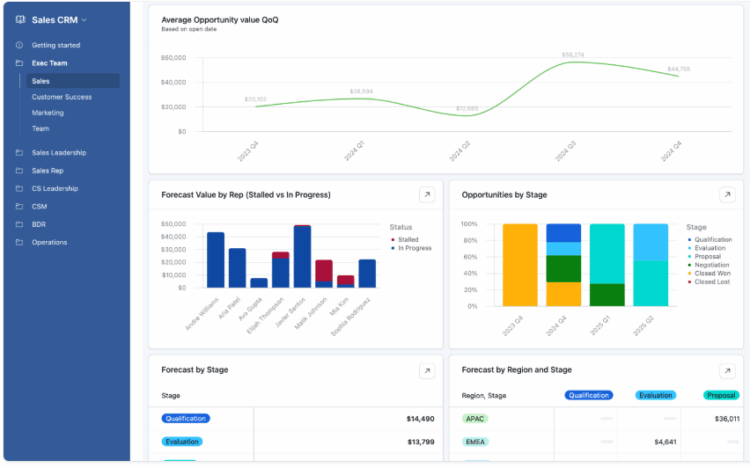
- And the cherry on top: Airtable Interfaces let you build custom workflows and dashboards – so no more hunting through a giant spreadsheet to find what you need.
Why Airtable Works So Well for Charities
- Easy to import existing data — The transition from spreadsheets is almost painless.
- Supports existing workflows — No need to reinvent the wheel, just make it spin smoother.
- Affordable — Especially compared to high-end CRM platforms.
- Fully customisable — Tailor it perfectly to how your membership model actually works.
- Granular user permissions — Let staff or volunteers update member records or add payments without seeing sensitive member data (great for GDPR compliance).
- Massive community support — Tons of Airtable tutorials and integration guides are just a YouTube search away.
A Few Downsides to Consider
– It’s not completely free (but significantly cheaper than most CRM systems).
– It’s not a full CRM like Salesforce or HubSpot—so if you need deep donor management, you may still need additional tools.
One Source of Truth: Stop the Membership Mayhem
One of the biggest issues I see charities stumble over is having data scattered across too many systems.
Here’s a common scenario:
- Your CRM says a member’s paid
- Your accounting software says they haven’t
- The website still grants them access to member-only content
So which one is right? Just one of these problems on its own is annoying; multiply that by 50 membership discrepancies a month, and you’ve got an admin nightmare on your hands.
That’s why I recommend using Airtable as your single source of truth. Everything else—your website, email marketing platform, event tools—should pull data from Airtable, not the other way around. That way there’s no contradiction: if Airtable says someone’s a lapsed member, that’s definitive.
Example Automations That Save You Time (and Sanity)
What makes Airtable even more powerful is that it plays so well with others. Here’s how you can connect it to your existing tools:
When a Member Signs Up or Renews
– Member pays via Stripe or GoCardless on your WordPress site.
– Airtable receives confirmation and adds/updates their record.
– A user account is automatically created or updated on the website, granting access to private content and member-only event registrations.
Membership Expiry Handling
– Airtable tracks expiry dates.
– If someone doesn’t renew, Airtable updates their status to “lapsed.”
– Your website then automatically removes access to premium or discounted content until they renew.
Email & Communication Automations
– Use Airtable to trigger renewal reminders before and after expiration.
– Sync with tools like Mailchimp to build dynamic “active member” segments so only valid members receive member-only emails and newsletters.
Key Takeaway:
If your charity is struggling to manage memberships with spreadsheets—or feeling hemmed in by overly rigid CRMs—Airtable offers a flexible, low-cost solution. It combines the familiarity of Excel with the power of a relational database and automation tools, making it easier to keep your member data accurate, accessible, and (most importantly) actionable. Use it as your central source of truth, and free your team from the chaos of piecemeal systems and manual syncs.
Ready to ditch the spreadsheets? Airtable might just be your perfect fit.
